UNI-T UT81C Oscilloscope Multimeter Review (Upgraded Version of UT81B)
Recently the measuring equipment market was added up by the devices that combine the features of several measuring devices. For instance, these are digital scope multimeters. UNI-T brand is well known for its high accuracy and reliable measuring equipment.
ToolBoom online store offers UNI-T UT81C multifunction measuring equipment, which is an upgraded version of UNI-T UT81B and has advanced technical specifications. It combines the functions of a full fledged multimeter and oscilloscope with analogue bandwidth up to 16 MHz. How did engineers manage to combine such a complicated device as an oscilloscope with a multimeter in one housing? What was the sacrifice for the sake of portability and what useful functions UNI-T UT81C possess?
UNI-T UT81C Scope Multimeter Ergonomics
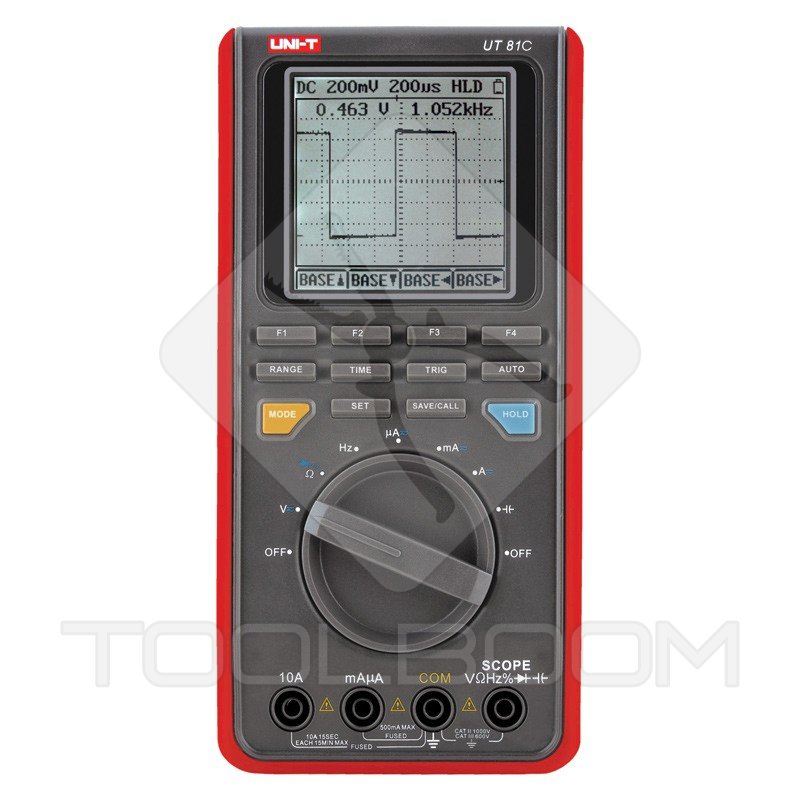
UNI-T UT81C scope multimeter is a device of medium dimensions and light weight. That is why it is easy to keep it in hand. Round knob is used to turn on power and shift mode of the multimeter. There are separate buttons for oscilloscope control and universal buttons for measuring device control in two modes.
UNI-T UT81C device has a small fault: some buttons are not enough touch sensitive. You need to heavily press them if you want to make them work. At the same time measurement mode switch of the multimeter works quite well.
There is support, section for batteries and socket for connection to personal computer on the backside of UNI-T UT81C scope multimeter. Small rubber feet in the bottom of the case help fixing measuring device when it is placed on the slippery surface.
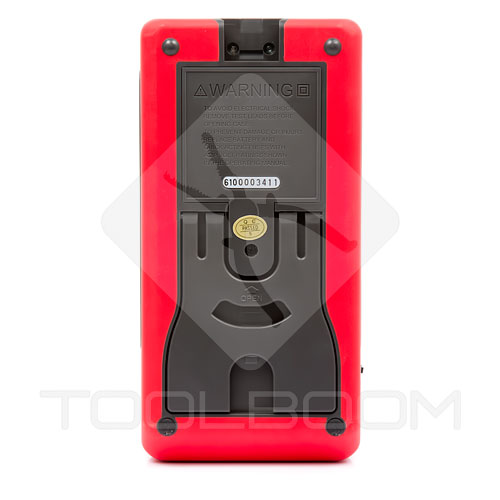 UNI-T UT81C Digital Scope Multimeter
Probes of UNI-T UT81C scope multimeter are used for two working modes of the measuring device.
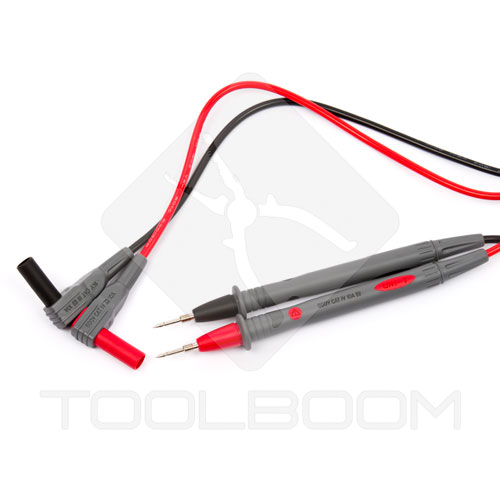 UNI-T UT81C Scope Multimeter Probes
You can connect alligator clips to UNI-T UT81C probes, and it would be more comfortable for you to hold on pins on the electric schemes. They are equipped with rubber insulating jackets. It allows you to connect probes to alive terminals.
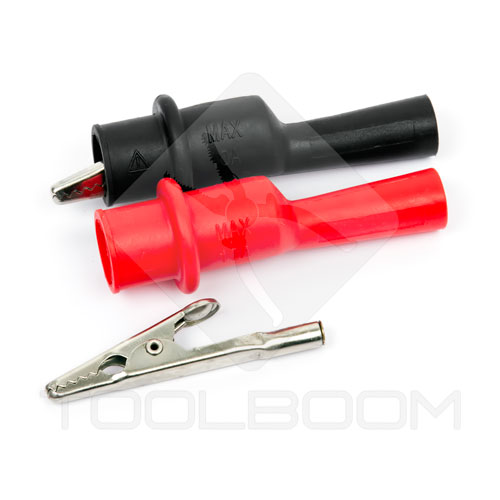 UNI-T UT81C Scope Multimeter Alligator Clips
UNI-T UT81C Scope Multimeter Menu Control
Control of handheld oscilloscope which also has functions of the multimeter significantly differs from control of the fixed device. First of all, there are less buttons on the control panels and menu is much more user friendly. However, you need to get used to control even of such a simple device.
There are special buttons on the control panel for oscilloscope control and general buttons for oscilloscope and multimeter control. You can switch between multimeter functions with the aid of round knob. MODE button is used for switching between two modes of measuring device.
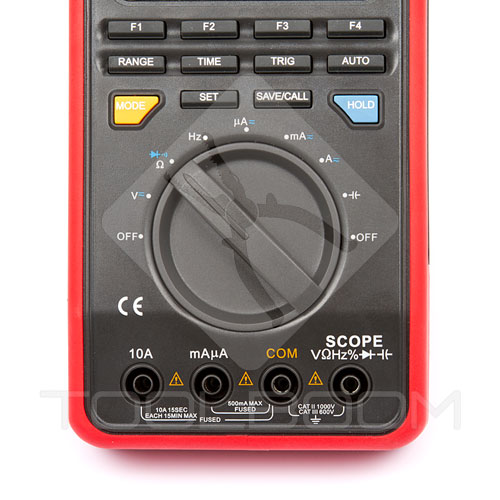 UNI-T UT81B Scope Multimeter Control Panel
You can set type of the measured parameter with the aid of the switch:
- voltage
- resistance, circuit continuity check, diode test
- frequency
- current
- capacitance
F1 button is meant for selection of the type of current and voltage to be measured (direct or alternate), and also circuit continuity check and diode test mode. Measuring range selection can be both manual and automatic.
In voltage and currency measuring mode you can select type of voltage/currency (AC/DC), set mode of relative measurements (REL), manually set measuring range (RANGE).
In resistance measuring mode you can select relative measurements mode and measuring range. You can also select mode of diode test or circuit continuity check.
When measuring signal frequency you can turn on mode of duty factor.
And finally capacitance measuring function provides only relative measurements mode.
Oscilloscope function is active during voltage, frequency and current measurement. Wave form scale can be set manually or automatically by AUTO button. In order to change amplitude scale use F3 and F4 (RANGE) buttons, and F1 and F2 (MOVE) buttons are meant for positioning on the display. In order to change time scale and horizontal movement of oscillogram you need to move to TIME mode and by F1, F2, F3 and F4 buttons, signed on the BASE screen, set the necessary parameters. You can distinguish automatic scale setting from the manual in the following way: In manual mode voltage or time parameter is displayed by black symbols on the white background. In automatic mode situation is quite the opposite.
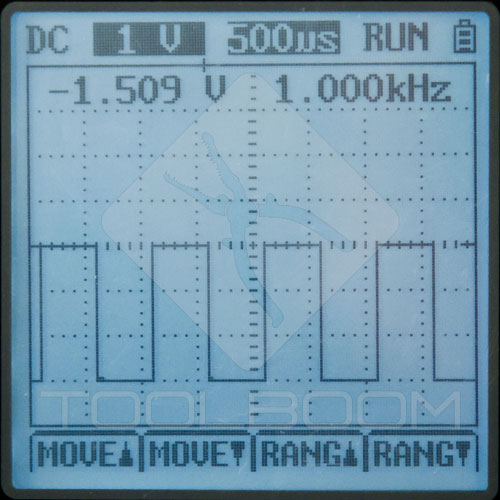 UNI-T UT81C Oscilloscope Mode
Trigger is an important option of oscilloscope. This mode allows triggering signal according to the certain level of rising or falling edge. There are three trigger modes: automatic, normal and single.
Mode of saving oscillograms allows storing 10 wave forms into UNI-T UT81C scope multimeter memory, and subsequently display them on the screen. You cannot zoom saved signal, the only operation you can perform with it is movement along the time base.
Settings mode of the UNI-T UT81C measuring device (SET) allows adjusting function of automatic shutdown of power, sound signal during circuit continuity check and display parameters.
- Auto Off — setting time of automatic shutdown of power within the range from 1 to 31 minutes.
- BK Light — display brightness adjustment function. The level varies within the range from 1 to 31. After device shutdown this parameter is not saved.
- Contrast — adjustment of display contrast ratio. Contrast ratio adjustment in relative units from 1 to 31. This parameters is also not saved after the device shutdown.
- BEEP — option of turning on and off of the sound signal during the circuit continuity check. After power is shut down settings are not saved.
UNI-T UT81C Scope Multimeter Display
Display of UNI-T UT81C scope multimeter should be large enough for oscillogram display. In multimeter mode monochrome screen displays big figures which are quite visible in daylight and in dark places. Backlight is almost unnoticeable in a daylight and is perfectly visible in conditions of dim illumination.
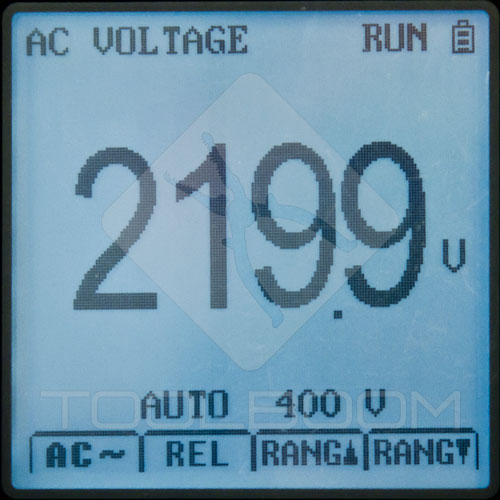 UNI-T UT81C Multimeter Mode
UNI-T UT81C Scope Multimeter Software
UNI-T UT81C digital scope multimeter can be connected to personal computer. USB cable with optical coupler is used for connection.
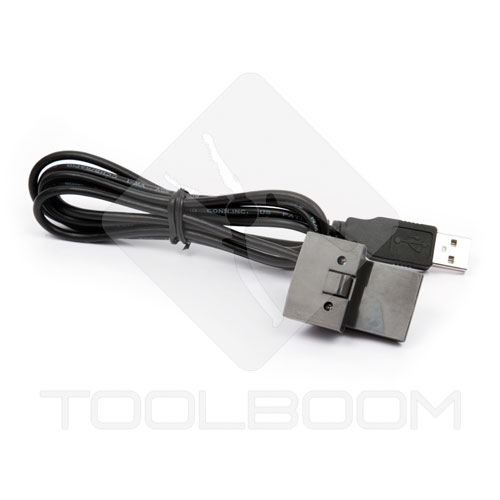 UNI-T UT81C Scope Multimeter USB Connection Cable
The software for UNI-T UT81C oscilloscope multimeter may be easily installed on the computer. It allows registering readings of all measured units in the form of the table. Oscillograms are displayed in graphics format.
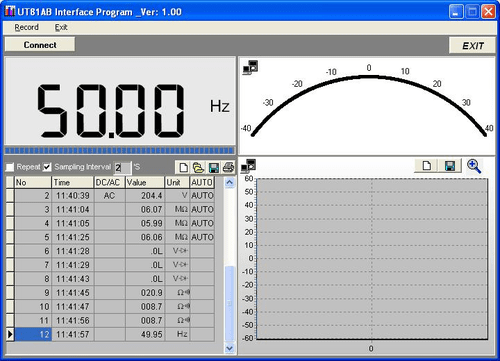
Oscilloscope measurements display:

The data is stored in the form of the table:

Oscillogram picture is saved in bmp. format:
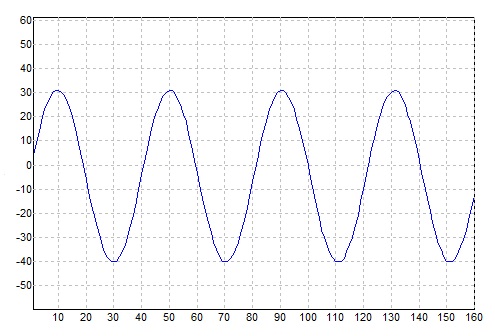
Interval between measurements can be set from 1 second up to several hours, you can also skip values repeated in sequence which allows you to significantly shorten the table. Number of measuring points is set from 1000 up to infinity. The program sets interval of 0.2 seconds between measurements by default.
Although the software to UNI-T UT81C scope multimeter is quite easy it helps following changes in the parameters of electric mains and electric circuits.
UNI-T UT81C Scope Multimeter Measurement Features
We decided to hold small test of UNI-T UT81B scope multimeter and check its real capabilities. Using SIGLENT SDG1032X waveform generator was a possibility to give oscilloscope a run in the whole range of working frequencies. We fed signals of various forms and frequencies to the input of UNI-T UT81C scope multimeter. That is what we've got:
Let's start from the square wave (meander). The pictures display only relative scale of the amplitude. It is connected with the peculiarity of software of UNI-T UT81C scope multimeter with the aid of which we made screen shots. The pictures display the difference of wave forms on the various frequencies:
Square wave
Signal frequency is 10 kHz, set amplitude is 2.5 V. Signal amplitude does not decrease during measuring.
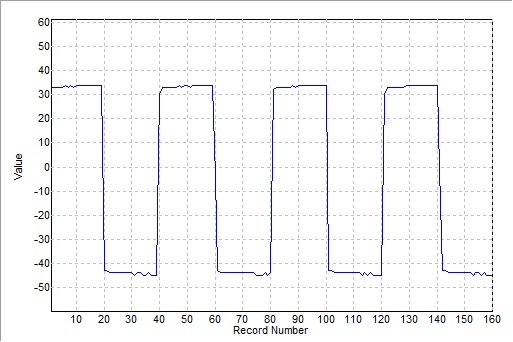
Signal frequency is 100 kHz, set amplitude - 2.5 V. Signal amplitude does not decrease during measuring.
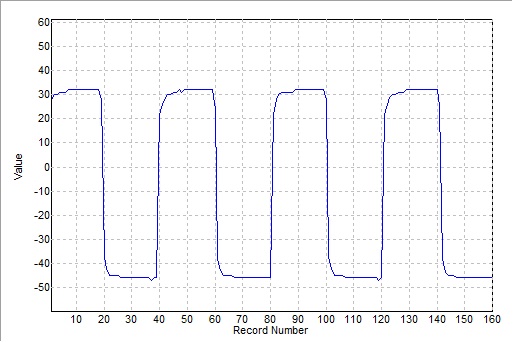
Signal frequency is 400 kHz, set amplitude - 2.5 V. Signal amplitude almost does not decrease during measuring.
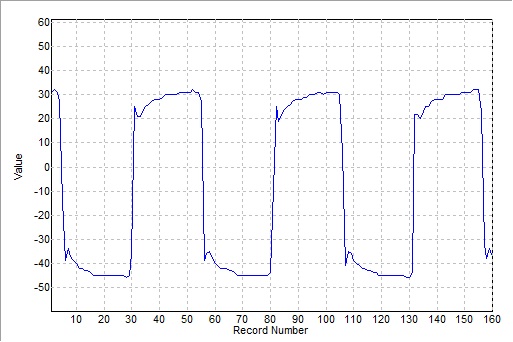
Signal frequency is 1 MHz, set amplitude - 2.5 V. Amplitude decreased during measurement to 2.3 V.
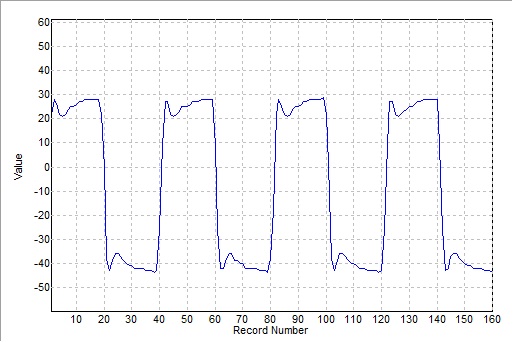
Signal frequency is 5 MHz, set amplitude - 2.5 V. Amplitude decreased during measurement to 2.1 V.
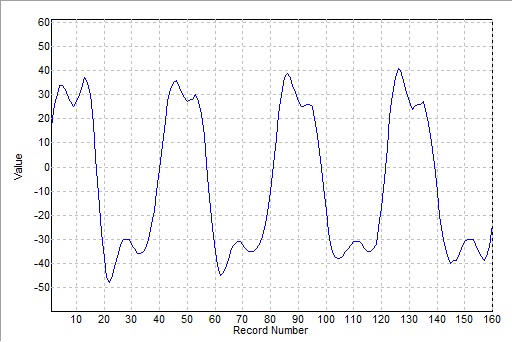
Signal frequency is 8 MHz, set amplitude is 2.5 V.
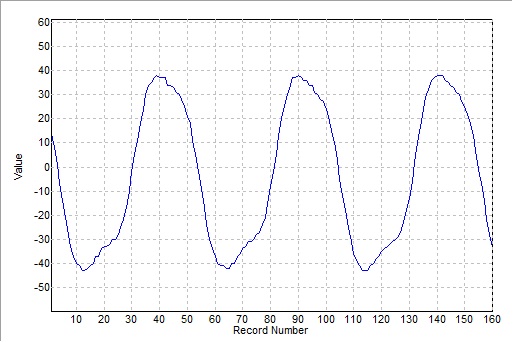
Signal frequency is 16 MHz, set amplitude is 2.5 V.
Meander amplitude on the frequency of 8 MHz decreases to 1.4 V, on the frequency of 16 MHz decreases to 1 V. You can also see what is happening to its shape. Lets show the same meander taken by Rigol DS7024 digital oscilloscope with the aid of coaxial cable. Signal frequency is 8 MHz & 16 MHz, amplitude is 2.5 V:
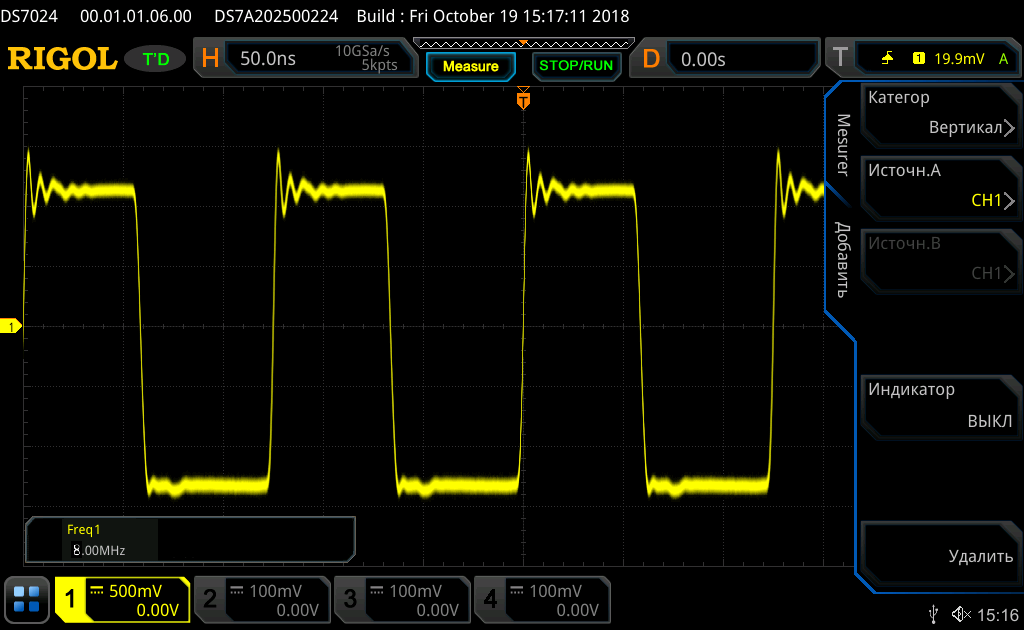
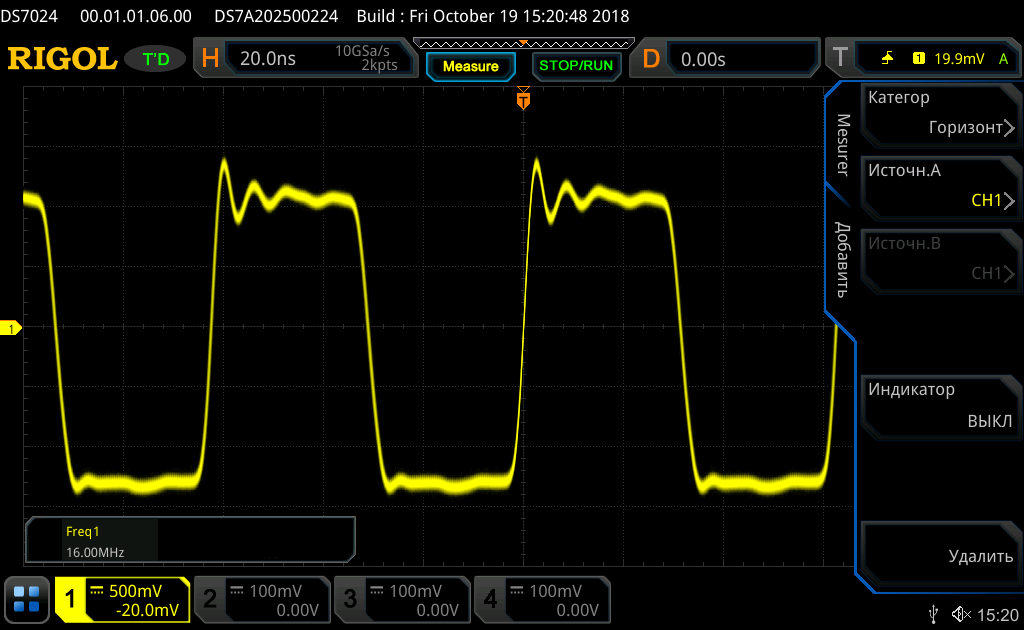
The shape remains more or less square, and the amplitude almost does not decrease.
Ramp wave
Signal frequency is 400 kHz, set amplitude is 2.5 V.
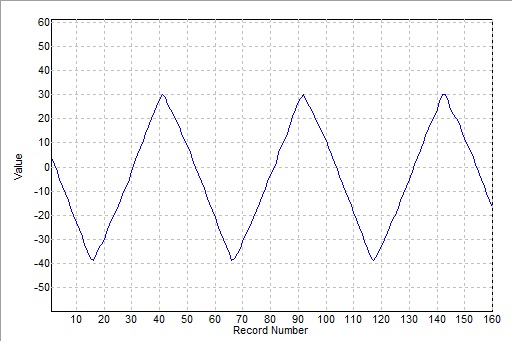
Signal amplitude during the measuring is 2.3 V, the shape is well preserved.
Sine wave
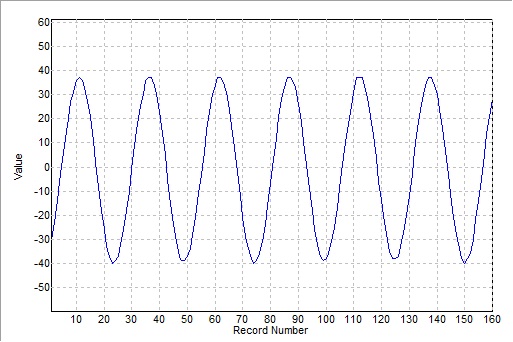
Signal frequency is 500 kHz, set amplitude is 2.5 V. Amplitude shown by the oscilloscope is approximately 2.3 V.
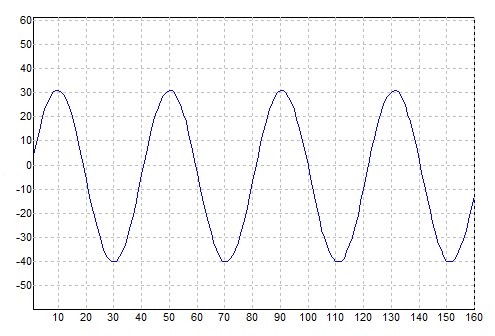
At a frequency of 1 MHz the amplitude decreases to 2.2 V.
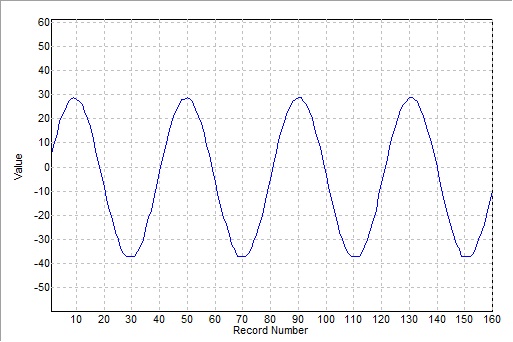
At a frequency of 8 MHz the amplitude decreases to 2 V.
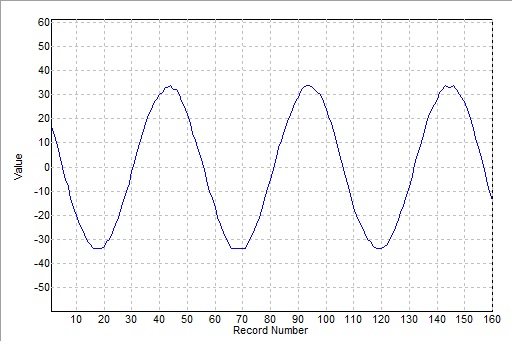
At a frequency of 16 MHz the amplitude decreases to 1.8 V.
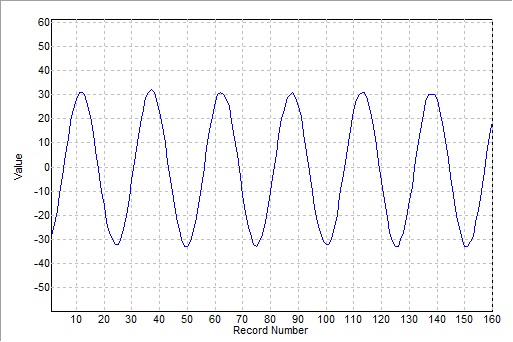
This test showed that using common probes of the multimeter leads to incorrect work of the oscilloscope. The signal (specially meander) shape was distorted and lost its amplitude on the high frequencies. Only the application of coaxial cable allowed us to obtain good data. This problem can be solved by application of special adapters of oscilloscope probes (not included in the package).
UNI-T UT81C Scope Multimeter Technical Specifications
| Display (LCD) | Monochrome, 3999 digit, refreshment 2-3 times/s |
| Working environment temperature | from 0 ºC to 40 ºC |
| Storage temperature | from -10 ºC to + 50 ºC |
| Relative humidity | ≤ 75% at temperature from 0 ºC to 40 ºC |
| Power supply | 1.5 V (R6) × 4 4 batteries or power supply unit |
| Dimensions | 200 × 100 × 50 mm |
| Weight | 500 g (with batteries) |
Multimeter Technical Specifications
| Parameter | Measuring range (accuracy) | Overload protection |
|---|---|---|
| DC voltage | 400 mV/4/40/400 V ±(0.8%+8) 1000 V ±(1.0%+8) |
1000 V |
| AC voltage | 4/40/400 V ±(1.0%+15) 1000 V ±(1.2%+15) |
1000 V |
| DC current | 400/4000 μA ±(1.0%+8) 40/400 mA ±(1.2%+8) 4/10 A ±(1.5%+8) |
fuse 0.5 A/250 V, d5×20 mm fuse 10 A/250 V, d5×20 mm (Measuring time up to 10 seconds, interval between measurements - 15 minutes) |
| AC current | 400/4000 μA ±(1.5%+8) 40/400 mA ±(2.0%+8) 4/10 A ±(2.5%+5) |
fuse 0.5 A/250 V, d5×20 mm fuse 10 A/250 V, d5×20 mm (Measuring time up to 10 seconds, interval between measurements - 15 minutes) |
| Resistance | 400 Ω ±(1.2%+5) 4/40/400 kΩ ±(1.0%+5) 4 MΩ ±(1.2%+5) 40 MΩ ±(1.5%+5) |
250 V DC or AC rms |
| Frequency | 10 Hz - 10 MHz ±(0.1%+3) | 250 V DC or AC rms Amplitude of input signal: from 300 mV to 30 Vrms for frequency ≤ 1 MHz from 600 mV to 5 Vrms for frequency > 1 MHz |
| Pulse ratio | 0.1%-99.9% | 250 V DC or AC rms |
| Capacitance | 40 nF ±(3.0%+10) 400 nF/4 μF ±(3.0%+8) 40 μF/100 μF ±(4.0%+8) |
250 V DC or AC rms |
| Diodes test | 250 V DC or AC | |
| Continuity test | 250 V DC or AC Sound signal at resistance ≤ 100 Ω |
Oscilloscope Technical Specifications
| Horizontal System | |
|---|---|
| Sampling rate | 40 MHz |
| Sampling rate / scale | 20 pixels |
| Refresh rate | >5 |
| Trigger modes | Auto, Normal, Single |
| Horizontal System | 100 ns/div - 5 s/div. (1-2-5) |
| Horizontal system accuracy | ±(0.1%+1 pixel) |
| Vertical system | |
| Analogue bandwidth | 16 MHz |
| Channels number | 1 |
| Input coupling | Direct component (DC) |
| Vertical resolution | 8 bit |
| Accuracy | ±(5.0%+1 pixel) |
| Maximum input voltage | 1000 V (maximum amplitude) |
| Voltage response | 200 mV/div – 500 V/div |
UNI-T UT81C Scope Multimeter Package Contents
- UNI-T UT81C digital scope multimeter
- 6 V power adapter
- Measuring probes
- Removable crocodile clips
- USB cable for computer connection
- Batteries
- CD with software
- User manual
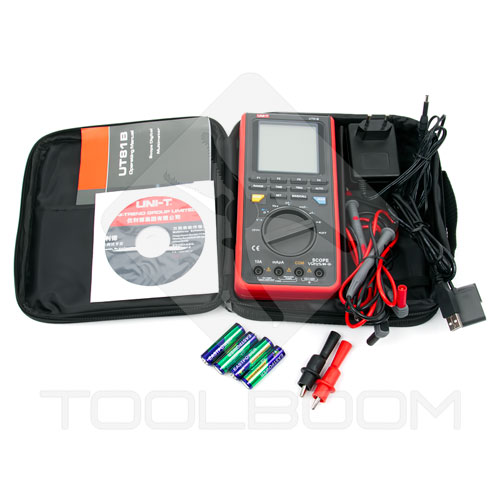
All items are packed into case:

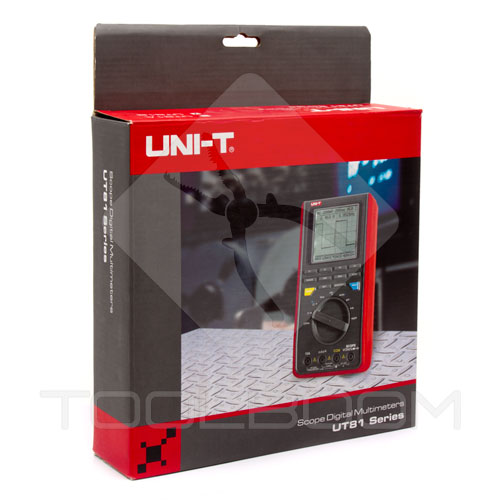
Package of UNI-T UT81C scope multimeter is quite bright. It's a good choice for the gift.
Conclusion
We described basic functions of UNI-T UT81C scope multimeter. First of all it's a full fledged multimeter with wide measuring range of electric values. This device lacks a lot of useful options of full fledged oscilloscopes, however, UNI-T UT81C is good enough for simple tasks of detecting faults in electric and electronic circuits and also their adjustment. It's quite enough for working with signals up to 16 MHz.
Simple software of UNI-T UT81C measuring equipment allows registering measurements in easy format and further analysis of the obtained data.
You can adjust brightness and contrast ratio of the display, set time of automatic power shutdown in the settings menu.
UNI-T UT81C Digital Scope Multimeter is available at ToolBoom online store.